UMT [12-01-26] UMTv2/UMTPro QcFire v13.0 - Huawei P60 Pro, Samsung and more...

UMT Box

SPYROS

Product Supporter
Jan 27, 2023
376
1,307
PK
We are pleased to announce
UMTv2 / UMT Pro
Innovative and Intelligent


QcFire v13.0
The Ultimate Qualcomm Tool


Supported Functions
- Read / Write Firmware
- Backup / Restore QCN
- IMEI Repair in FTM/Diag + Flash Mode
- Backup / Reset / Restore Security (EFS)
- Reset FRP (Google Factory Reset Protection)
- Format UserData
- Read Pattern Lock (Android < 6.0, Un-Encrypted Devices Only)
- Reset Locks (PIN, Password, Pattern w/o Data Loss, Un-Encrypted Devices Only)
- Enable Diag (Need OEM Unlock, May not work on BL Locked Devices)
- Reboot to EDL from Fastboot
- Reset Mi Account for Xiaomi Devices
- Disable Mi Account for Xiaomi Devices
- Factory Reset (sideload Mode) for Xiaomi Devices
- Disable / Restore Locks for Encrypted Userdata
- Motorola Boot Repair
- Xiaomi EDL Locked Device Service
- Bootloader Unlock in EDL Mode for some Xiaomi Devices
- One Click Root in EDL Mode for Generic Qualcomm Devices
- Forensic Functions (Read Contacts / Messages in EDL Mode)
- One Click Lock Reset for Vivo Phones (Encrypted Userdata)
- Factory Method for Format FS
- EDL Authentication using Xiaomi Auth App (Service Account Required)
- Xiaomi Wipe EFS in Sideload Mode
- Xiaomi IMEI Repair for RSA Protected Phones
- Xiaomi Boot Loader Unlock
- Unique Method for Vivo Reset Locks for Protected Devices
- Xiaomi EDL Auth Using UMT Server
- Xiaomi Flashing in Fastboot Mode
- Nokia Factory Firmware (nb0) Direct Flashing in EDL mode
- Oppo OFP Firmware Exctration Added
- Xiaomi Free Auth Service (bypass).
- Mi Account Reset without Relock
- Mi Account Patch on Flashing (EDL/Fastboot)
- Samsung MDM Unlock in EDL Mode
- Huawei ID Reset
- Vivo Functions in Fastboot Mode
- Universal Huawei ID Reset
- Xiaomi Sideload Reset FRP/Mi Account
- Xiaomi Sideload Firmware Update
- Xiaomi Temporary BL Unlock
- Xiaomi Enable Diag (NO ROOT)
- Samsung Lost Mode Reset in EDL Mode
- Samsung KG Bypass
- Samsung Unbrick / Dead Boot Repair
- Samsung TAR to Unbrick Firmware Creator
- Xiaomi Auth Bypass For Newer Devices
- Oppo/Realme/OnePlus VIP Bypass
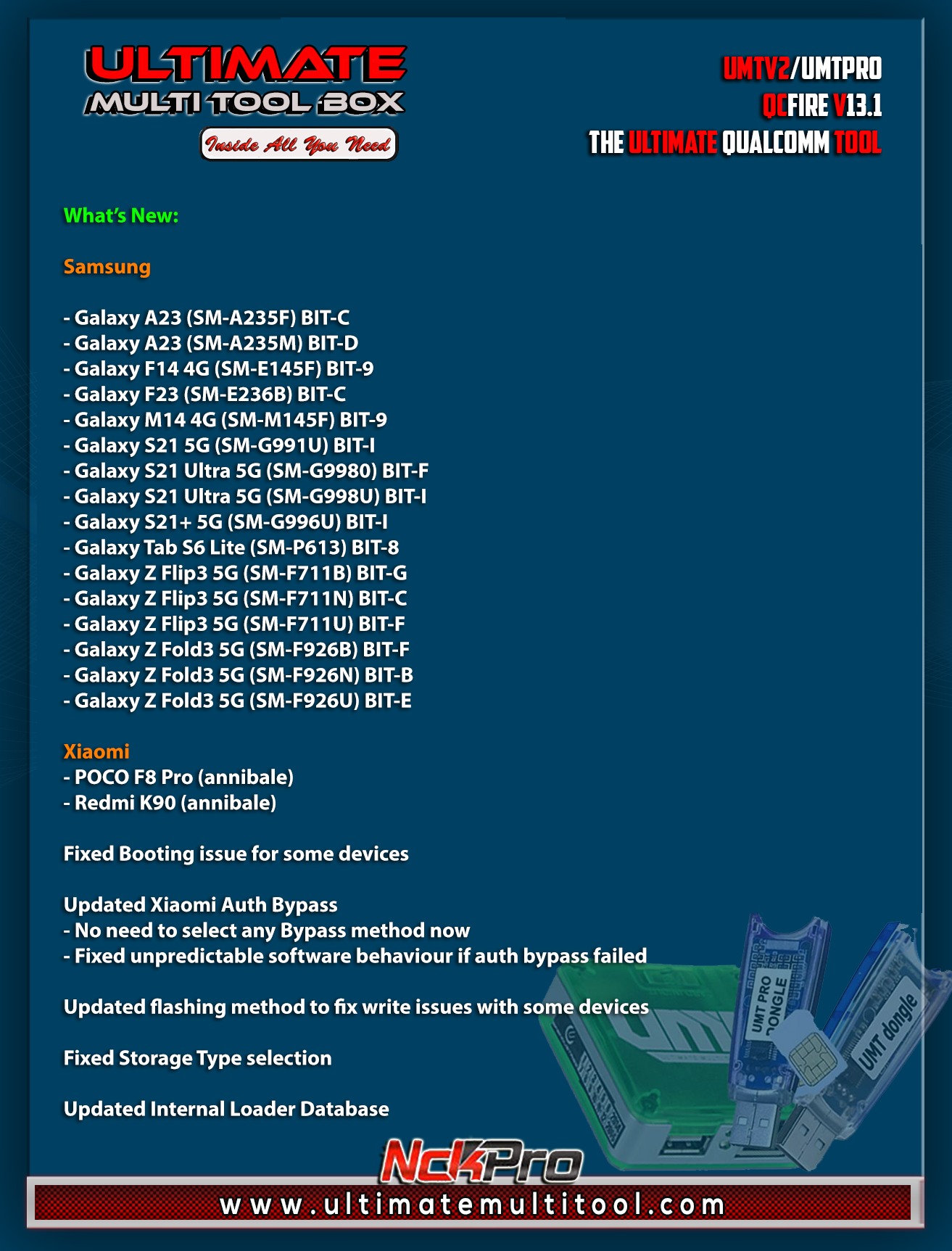


Added:

Honor
- Pad X7 (JMS-W09)

Huawei
- P60 Pro (MNA-LX9)

Lenovo
- Tab M10 (TB-X505F)

Nokia
- 9 PureView (TA-1094)

Samsung
- Galaxy A02s (SM-A025U1) BIT 6
- Galaxy M23 (SM-M236B) BIT-C
- Galaxy S20 FE 5G (SM-G781N) BIT-D
- Galaxy S20 FE 5G (SM-G781V) BIT-L
- Galaxy S20 FE 5G (SM-G781W) BIT-W
- Galaxy S21 FE 5G (SM-G990U2) BIT-I
- Galaxy Tab A9+ (SM-X210) BIT-9
- Galaxy Tab A9+ (SM-X216C) BIT-9
- Galaxy Tab A9+ (SM-X216N) BIT-9
- Galaxy Tab Active4 Pro (SM-T636B) BIT-9
- Galaxy Tab Active4 Pro (SM-T638U) BIT-9
- Galaxy Tab S7 FE (SM-T735) BIT-9
- Galaxy Z Flip (SM-F7000) BIT-B
- Galaxy Z Fold2 5G (SM-F9160) BIT-8
- Galaxy Z Fold4 5G (SM-W9023) BIT-8

Takumi
- Kazuna eTalk (KAZ-F019)

ZTE
- nubia RedMgic 7 (NX679J)


Updated Booting Function to fix issues in 12.9


Updated Internal Loader Database


CONNECTION METHOD FOR SAMSUNG:

Method to connect some Samsung Devices is already in Log.
For newer devices, do the following:
- Hold VOL UP + DOWN on Device.
- Hold Button on EDL Cable.
- Insert Cable to Device while holding EDL Cable Button.
- Now rapidly click both VOL UP + DOWN at the same time.
- Once you have clicked VOL UP + DOWN more than 3 times, leave EDL Cable Button but keep rapidly clicking VOL UP + DOWN.
- Stop clicking VOLUME Buttons once device is connected in EDL Mode.
- On new firmware version, you need to click VOL UP + DOWN rapidly for around 10-20 times.


Special thanks to all our users who helped us with their test reports.


Please use UMT Card Manager to Update Card Counter / Firmware / Activate Add-on, available via Support Access.


Fix Forbidden Application Detected Error


It Has Begun...
Keep Following Us...
Some Nice Updates Are On The Way...


SPECIAL THANKS TO OUR VALUABLE USERS FOR THEIR LOVE AND SUPPORT FOR MORE THAN 10 YEARS


What is GRTool website?

www.gsmrepairtool.com

GRTool is a firmware paid website, that will be updated always.

Why are we advertising it now?
For AVB Users you can register an account there and use as per Dongle or box user allowance.

Can we all use it as AVB users?
No, only those who buy new box or dongle or renews new license will have 1-year free support.
so basically, now you have a BIG saving on your new purchase or activation.


WARNING :
ESN / MEID / IMEI REPAIR IS INTENDED TO REPAIR ESN / MEID / IMEI TO ORIGINAL ONE WRITTEN ON PHONE BACK LABEL / BOX. WE DO NOT ENDORSE OR ENCOURAGE ESN / MEID / IMEI CHANGING. ITS ILLEGAL. USER IS SOLE RESPONSIBLE FOR ANY ILLEGAL ACTIVITY DONE WITH USE OF FEATURES PROVIDED IN OUR SOFTWARE, NOT LIMITED TO ESN / MEID / IMEI.


ANY USER USING OUR SOFTWARE FOR ILLEGAL PURPOSE WILL BE SOLE RESPONSIBLE FOR HIS ACTS.

WE PROHIBIT USE OF OUR SOFTWARE FOR ANY ILLEGAL PURPOSE.

STATUTORY WARNING - READ CAREFULLY
Using International Edition of our software is prohibited by Indian Law.
We strictly advice you to use Indian Edition if you are in India.
If you use International Edition in India, it may cause legal action against you by local law enforcement agencies.
We will not be liable for any loss or damaged caused.


How to Download:
- Download UMT Support Access.
- Connect UMT Box/Dongle to PC and Run UMT Support Access.
- Download required Executable from Installer folder.
- Enjoy!
- Download Mirrors


PLEASE DO NOT POST OFF TOPIC HERE. ONLY POST REGARDING THIS UPDATE AND SUPPORTED MODELS. ANY OFF TOPIC POST WILL BE DELETED


Telegram


Br,
UMT
 
Last edited:

abdullahlonati12

Active Member
Aug 20, 2017
22
3
lahore
We are pleased to announce
UMTv2 / UMT Pro
Innovative and Intelligent


QcFire v12.5
The Ultimate Qualcomm Tool


Supported Functions
- Read / Write Firmware
- Backup / Restore QCN
- IMEI Repair in FTM/Diag + Flash Mode
- Backup / Reset / Restore Security (EFS)
- Reset FRP (Google Factory Reset Protection)
- Format UserData
- Read Pattern Lock (Android < 6.0, Un-Encrypted Devices Only)
- Reset Locks (PIN, Password, Pattern w/o Data Loss, Un-Encrypted Devices Only)
- Enable Diag (Need OEM Unlock, May not work on BL Locked Devices)
- Reboot to EDL from Fastboot
- Reset Mi Account for Xiaomi Devices
- Disable Mi Account for Xiaomi Devices
- Factory Reset (sideload Mode) for Xiaomi Devices
- Disable / Restore Locks for Encrypted Userdata
- Motorola Boot Repair
- Xiaomi EDL Locked Device Service
- Bootloader Unlock in EDL Mode for some Xiaomi Devices
- One Click Root in EDL Mode for Generic Qualcomm Devices
- Forensic Functions (Read Contacts / Messages in EDL Mode)
- One Click Lock Reset for Vivo Phones (Encrypted Userdata)
- Factory Method for Format FS
- EDL Authentication using Xiaomi Auth App (Service Account Required)
- Xiaomi Wipe EFS in Sideload Mode
- Xiaomi IMEI Repair for RSA Protected Phones
- Xiaomi Boot Loader Unlock
- Unique Method for Vivo Reset Locks for Protected Devices
- Xiaomi EDL Auth Using UMT Server
- Xiaomi Flashing in Fastboot Mode
- Nokia Factory Firmware (nb0) Direct Flashing in EDL mode
- Oppo OFP Firmware Exctration Added
- Xiaomi Free Auth Service (bypass).
- Mi Account Reset without Relock
- Mi Account Patch on Flashing (EDL/Fastboot)
- Samsung MDM Unlock in EDL Mode
- Huawei ID Reset
- Vivo Functions in Fastboot Mode
- Universal Huawei ID Reset
- Xiaomi Sideload Reset FRP/Mi Account
- Xiaomi Sideload Firmware Update
- Xiaomi Temporary BL Unlock
- Xiaomi Enable Diag (NO ROOT)
- Samsung Lost Mode Reset in EDL Mode
- Samsung KG Bypass
- Samsung Unbrick / Dead Boot Repair
- Samsung TAR to Unbrick Firmware Creator
- Xiaomi Auth Bypass For Newer Devices


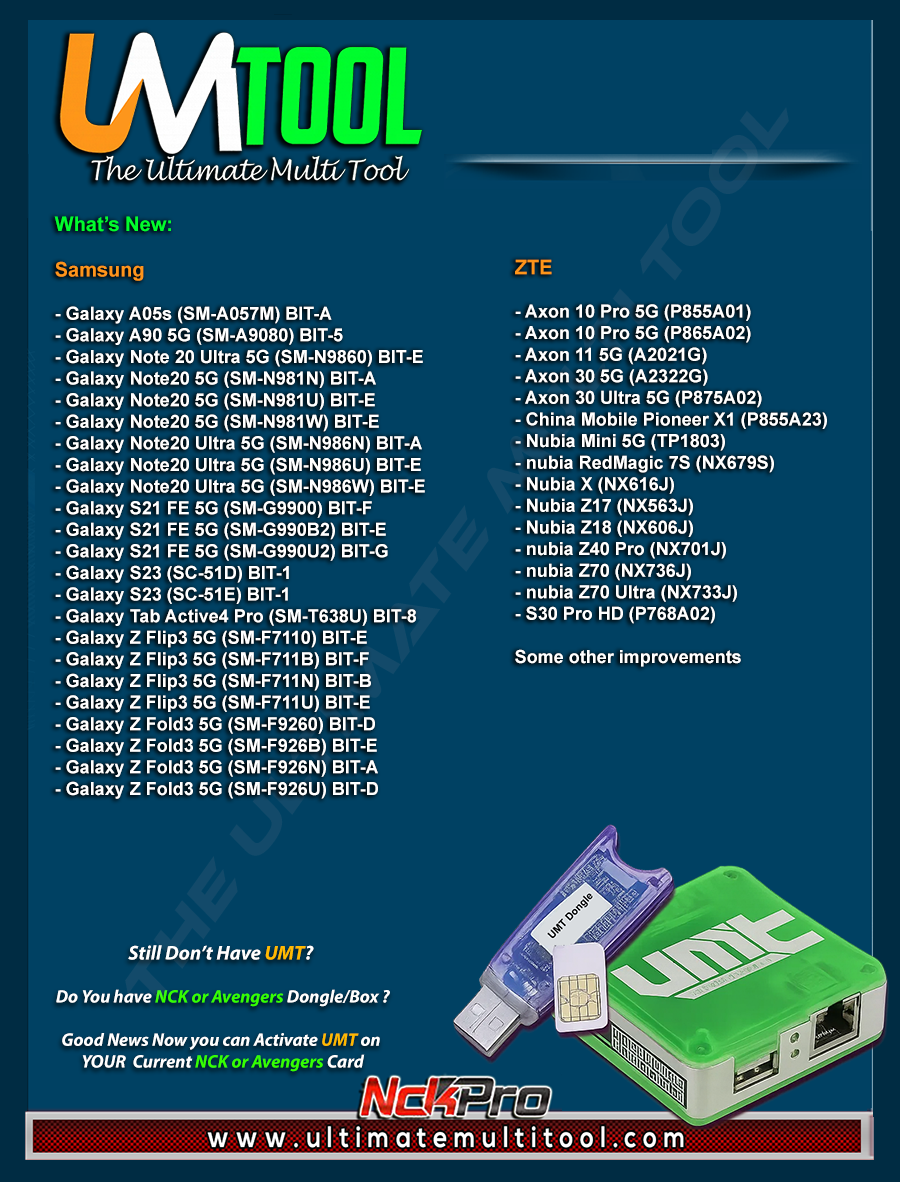
What's New:


Samsung
- Galaxy A05s (SM-A057M) BIT-A
- Galaxy A90 5G (SM-A9080) BIT-5
- Galaxy Note 20 Ultra 5G (SM-N9860) BIT-E
- Galaxy Note20 5G (SM-N981N) BIT-A
- Galaxy Note20 5G (SM-N981U) BIT-E
- Galaxy Note20 5G (SM-N981W) BIT-E
- Galaxy Note20 Ultra 5G (SM-N986N) BIT-A
- Galaxy Note20 Ultra 5G (SM-N986U) BIT-E
- Galaxy Note20 Ultra 5G (SM-N986W) BIT-E
- Galaxy S21 FE 5G (SM-G9900) BIT-F
- Galaxy S21 FE 5G (SM-G990B2) BIT-E
- Galaxy S21 FE 5G (SM-G990U2) BIT-G
- Galaxy S23 (SC-51D) BIT-1
- Galaxy S23 (SC-51E) BIT-1
- Galaxy Tab Active4 Pro (SM-T638U) BIT-8
- Galaxy Z Flip3 5G (SM-F7110) BIT-E
- Galaxy Z Flip3 5G (SM-F711B) BIT-F
- Galaxy Z Flip3 5G (SM-F711N) BIT-B
- Galaxy Z Flip3 5G (SM-F711U) BIT-E
- Galaxy Z Fold3 5G (SM-F9260) BIT-D
- Galaxy Z Fold3 5G (SM-F926B) BIT-E
- Galaxy Z Fold3 5G (SM-F926N) BIT-A
- Galaxy Z Fold3 5G (SM-F926U) BIT-D

ZTE
- Axon 10 Pro 5G (P855A01)
- Axon 10 Pro 5G (P865A02)
- Axon 11 5G (A2021G)
- Axon 30 5G (A2322G)
- Axon 30 Ultra 5G (P875A02)
- China Mobile Pioneer X1 (P855A23)
- Nubia Mini 5G (TP1803)
- nubia RedMagic 7S (NX679S)
- Nubia X (NX616J)
- Nubia Z17 (NX563J)
- Nubia Z18 (NX606J)
- nubia Z40 Pro (NX701J)
- nubia Z70 (NX736J)
- nubia Z70 Ultra (NX733J)
- S30 Pro HD (P768A02)


Some other improvements


CONNECTION METHOD FOR SAMSUNG:

Method to connect some Samsung Devices is already in Log.
For newer devices, do the following:
- Hold VOL UP + DOWN on Device.
- Hold Button on EDL Cable.
- Insert Cable to Device while holding EDL Cable Button.
- Now rapidly click both VOL UP + DOWN at the same time.
- Once you have clicked VOL UP + DOWN more than 3 times, leave EDL Cable Button but keep rapidly clicking VOL UP + DOWN.
- Stop clicking VOLUME Buttons once device is connected in EDL Mode.


Special thanks to all our users who helped us with their test reports.


Please use
UMT Card Manager to Update Card Counter / Firmware / Activate Add-on, available via Support Access.


Fix Forbidden Application Detected Error


It Has Begun...
Keep Following Us...
Some Nice Updates Are On The Way...


SPECIAL THANKS TO OUR VALUABLE USERS FOR THEIR LOVE AND SUPPORT FOR MORE THAN 10 YEARS


WARNING :

ESN / MEID / IMEI REPAIR IS INTENDED TO REPAIR ESN / MEID / IMEI TO ORIGINAL ONE WRITTEN ON PHONE BACK LABEL / BOX. WE DO NOT ENDORSE OR ENCOURAGE ESN / MEID / IMEI CHANGING. ITS ILLEGAL. USER IS SOLE RESPONSIBLE FOR ANY ILLEGAL ACTIVITY DONE WITH USE OF FEATURES PROVIDED IN OUR SOFTWARE, NOT LIMITED TO ESN / MEID / IMEI.


ANY USER USING OUR SOFTWARE FOR ILLEGAL PURPOSE WILL BE SOLE RESPONSIBLE FOR HIS ACTS.

WE CONDEMN USE OF OUR SOFTWARE FOR ANY ILLEGAL PURPOSE.

STATUTORY WARNING - READ CAREFULLY
Using International Edition of our software is prohibited by Indian Law.
We strictly advice you to use Indian Edition if you are in India.
If you use International Edition in India, it may cause legal action against you by local law enforcement agencies.
We will not be liable for any loss or damaged caused.


How to Download:
- Download UMT Support Access.
- Connect UMT Box/Dongle to PC and Run UMT Support Access.
- Download required Executable from Installer folder.
- Enjoy!
- Download Mirrors


PLEASE DO NOT POST OFF TOPIC HERE. ONLY POST REGARDING THIS UPDATE AND SUPPORTED MODELS. ANY OFF TOPIC POST WILL BE DELETED


Telegram


Br,
UMT
Please add Xiaomi read write cert in mtk or qcom o4spd please please
 

bellalhussain

Junior Member
Nov 9, 2020
3
2
Dhaka, Bangladesh
We are pleased to announce
UMTv2 / UMT Pro
Innovative and Intelligent


QcFire v12.5
The Ultimate Qualcomm Tool


Supported Functions
- Read / Write Firmware
- Backup / Restore QCN
- IMEI Repair in FTM/Diag + Flash Mode
- Backup / Reset / Restore Security (EFS)
- Reset FRP (Google Factory Reset Protection)
- Format UserData
- Read Pattern Lock (Android < 6.0, Un-Encrypted Devices Only)
- Reset Locks (PIN, Password, Pattern w/o Data Loss, Un-Encrypted Devices Only)
- Enable Diag (Need OEM Unlock, May not work on BL Locked Devices)
- Reboot to EDL from Fastboot
- Reset Mi Account for Xiaomi Devices
- Disable Mi Account for Xiaomi Devices
- Factory Reset (sideload Mode) for Xiaomi Devices
- Disable / Restore Locks for Encrypted Userdata
- Motorola Boot Repair
- Xiaomi EDL Locked Device Service
- Bootloader Unlock in EDL Mode for some Xiaomi Devices
- One Click Root in EDL Mode for Generic Qualcomm Devices
- Forensic Functions (Read Contacts / Messages in EDL Mode)
- One Click Lock Reset for Vivo Phones (Encrypted Userdata)
- Factory Method for Format FS
- EDL Authentication using Xiaomi Auth App (Service Account Required)
- Xiaomi Wipe EFS in Sideload Mode
- Xiaomi IMEI Repair for RSA Protected Phones
- Xiaomi Boot Loader Unlock
- Unique Method for Vivo Reset Locks for Protected Devices
- Xiaomi EDL Auth Using UMT Server
- Xiaomi Flashing in Fastboot Mode
- Nokia Factory Firmware (nb0) Direct Flashing in EDL mode
- Oppo OFP Firmware Exctration Added
- Xiaomi Free Auth Service (bypass).
- Mi Account Reset without Relock
- Mi Account Patch on Flashing (EDL/Fastboot)
- Samsung MDM Unlock in EDL Mode
- Huawei ID Reset
- Vivo Functions in Fastboot Mode
- Universal Huawei ID Reset
- Xiaomi Sideload Reset FRP/Mi Account
- Xiaomi Sideload Firmware Update
- Xiaomi Temporary BL Unlock
- Xiaomi Enable Diag (NO ROOT)
- Samsung Lost Mode Reset in EDL Mode
- Samsung KG Bypass
- Samsung Unbrick / Dead Boot Repair
- Samsung TAR to Unbrick Firmware Creator
- Xiaomi Auth Bypass For Newer Devices


What's New:


Samsung
- Galaxy A05s (SM-A057M) BIT-A
- Galaxy A90 5G (SM-A9080) BIT-5
- Galaxy Note 20 Ultra 5G (SM-N9860) BIT-E
- Galaxy Note20 5G (SM-N981N) BIT-A
- Galaxy Note20 5G (SM-N981U) BIT-E
- Galaxy Note20 5G (SM-N981W) BIT-E
- Galaxy Note20 Ultra 5G (SM-N986N) BIT-A
- Galaxy Note20 Ultra 5G (SM-N986U) BIT-E
- Galaxy Note20 Ultra 5G (SM-N986W) BIT-E
- Galaxy S21 FE 5G (SM-G9900) BIT-F
- Galaxy S21 FE 5G (SM-G990B2) BIT-E
- Galaxy S21 FE 5G (SM-G990U2) BIT-G
- Galaxy S23 (SC-51D) BIT-1
- Galaxy S23 (SC-51E) BIT-1
- Galaxy Tab Active4 Pro (SM-T638U) BIT-8
- Galaxy Z Flip3 5G (SM-F7110) BIT-E
- Galaxy Z Flip3 5G (SM-F711B) BIT-F
- Galaxy Z Flip3 5G (SM-F711N) BIT-B
- Galaxy Z Flip3 5G (SM-F711U) BIT-E
- Galaxy Z Fold3 5G (SM-F9260) BIT-D
- Galaxy Z Fold3 5G (SM-F926B) BIT-E
- Galaxy Z Fold3 5G (SM-F926N) BIT-A
- Galaxy Z Fold3 5G (SM-F926U) BIT-D

ZTE
- Axon 10 Pro 5G (P855A01)
- Axon 10 Pro 5G (P865A02)
- Axon 11 5G (A2021G)
- Axon 30 5G (A2322G)
- Axon 30 Ultra 5G (P875A02)
- China Mobile Pioneer X1 (P855A23)
- Nubia Mini 5G (TP1803)
- nubia RedMagic 7S (NX679S)
- Nubia X (NX616J)
- Nubia Z17 (NX563J)
- Nubia Z18 (NX606J)
- nubia Z40 Pro (NX701J)
- nubia Z70 (NX736J)
- nubia Z70 Ultra (NX733J)
- S30 Pro HD (P768A02)


Some other improvements


CONNECTION METHOD FOR SAMSUNG:

Method to connect some Samsung Devices is already in Log.
For newer devices, do the following:
- Hold VOL UP + DOWN on Device.
- Hold Button on EDL Cable.
- Insert Cable to Device while holding EDL Cable Button.
- Now rapidly click both VOL UP + DOWN at the same time.
- Once you have clicked VOL UP + DOWN more than 3 times, leave EDL Cable Button but keep rapidly clicking VOL UP + DOWN.
- Stop clicking VOLUME Buttons once device is connected in EDL Mode.


Special thanks to all our users who helped us with their test reports.


Please use
UMT Card Manager to Update Card Counter / Firmware / Activate Add-on, available via Support Access.


Fix Forbidden Application Detected Error


It Has Begun...
Keep Following Us...
Some Nice Updates Are On The Way...


SPECIAL THANKS TO OUR VALUABLE USERS FOR THEIR LOVE AND SUPPORT FOR MORE THAN 10 YEARS


WARNING :

ESN / MEID / IMEI REPAIR IS INTENDED TO REPAIR ESN / MEID / IMEI TO ORIGINAL ONE WRITTEN ON PHONE BACK LABEL / BOX. WE DO NOT ENDORSE OR ENCOURAGE ESN / MEID / IMEI CHANGING. ITS ILLEGAL. USER IS SOLE RESPONSIBLE FOR ANY ILLEGAL ACTIVITY DONE WITH USE OF FEATURES PROVIDED IN OUR SOFTWARE, NOT LIMITED TO ESN / MEID / IMEI.


ANY USER USING OUR SOFTWARE FOR ILLEGAL PURPOSE WILL BE SOLE RESPONSIBLE FOR HIS ACTS.

WE CONDEMN USE OF OUR SOFTWARE FOR ANY ILLEGAL PURPOSE.

STATUTORY WARNING - READ CAREFULLY
Using International Edition of our software is prohibited by Indian Law.
We strictly advice you to use Indian Edition if you are in India.
If you use International Edition in India, it may cause legal action against you by local law enforcement agencies.
We will not be liable for any loss or damaged caused.


How to Download:
- Download UMT Support Access.
- Connect UMT Box/Dongle to PC and Run UMT Support Access.
- Download required Executable from Installer folder.
- Enjoy!
- Download Mirrors


PLEASE DO NOT POST OFF TOPIC HERE. ONLY POST REGARDING THIS UPDATE AND SUPPORTED MODELS. ANY OFF TOPIC POST WILL BE DELETED


Telegram


Br,
UMT
Oppo A3X Snapdragon 6s gen1 not supported in Qcfire . but
unlocktool already have support
please add this model next update
 
  • Like
Reactions: waseem345

karabo13

Active Member
Dec 2, 2024
23
5
South Africa
We are pleased to announce
UMTv2 / UMT Pro
Innovative and Intelligent


QcFire v12.8
The Ultimate Qualcomm Tool


Supported Functions
- Read / Write Firmware
- Backup / Restore QCN
- IMEI Repair in FTM/Diag + Flash Mode
- Backup / Reset / Restore Security (EFS)
- Reset FRP (Google Factory Reset Protection)
- Format UserData
- Read Pattern Lock (Android < 6.0, Un-Encrypted Devices Only)
- Reset Locks (PIN, Password, Pattern w/o Data Loss, Un-Encrypted Devices Only)
- Enable Diag (Need OEM Unlock, May not work on BL Locked Devices)
- Reboot to EDL from Fastboot
- Reset Mi Account for Xiaomi Devices
- Disable Mi Account for Xiaomi Devices
- Factory Reset (sideload Mode) for Xiaomi Devices
- Disable / Restore Locks for Encrypted Userdata
- Motorola Boot Repair
- Xiaomi EDL Locked Device Service
- Bootloader Unlock in EDL Mode for some Xiaomi Devices
- One Click Root in EDL Mode for Generic Qualcomm Devices
- Forensic Functions (Read Contacts / Messages in EDL Mode)
- One Click Lock Reset for Vivo Phones (Encrypted Userdata)
- Factory Method for Format FS
- EDL Authentication using Xiaomi Auth App (Service Account Required)
- Xiaomi Wipe EFS in Sideload Mode
- Xiaomi IMEI Repair for RSA Protected Phones
- Xiaomi Boot Loader Unlock
- Unique Method for Vivo Reset Locks for Protected Devices
- Xiaomi EDL Auth Using UMT Server
- Xiaomi Flashing in Fastboot Mode
- Nokia Factory Firmware (nb0) Direct Flashing in EDL mode
- Oppo OFP Firmware Exctration Added
- Xiaomi Free Auth Service (bypass).
- Mi Account Reset without Relock
- Mi Account Patch on Flashing (EDL/Fastboot)
- Samsung MDM Unlock in EDL Mode
- Huawei ID Reset
- Vivo Functions in Fastboot Mode
- Universal Huawei ID Reset
- Xiaomi Sideload Reset FRP/Mi Account
- Xiaomi Sideload Firmware Update
- Xiaomi Temporary BL Unlock
- Xiaomi Enable Diag (NO ROOT)
- Samsung Lost Mode Reset in EDL Mode
- Samsung KG Bypass
- Samsung Unbrick / Dead Boot Repair
- Samsung TAR to Unbrick Firmware Creator
- Xiaomi Auth Bypass For Newer Devices
- Oppo/Realme/OnePlus Auth Bypass


Added:

Motorola
- Moto E7 Plus (XT2081)
- Moto Tab G62 (XT2261-1)
- Moto Tab G62 (XT2261-2)

Samsung
- Galaxy A05s (SM-A057M) BIT-B
- Galaxy A23 5G (SM-A2360) BIT-B
- Galaxy A23 5G (SM-A236E) BIT-C
- Galaxy A8 Star (SM-G885F) BIT-5
- Galaxy C55 5G (SM-C5560) BIT-4
- Galaxy F14 (SM-E145F) BIT-8
- Galaxy F23 5G (SM-E236B) BIT-B
- Galaxy M23 5G (SM-M236B) BIT-B
- Galaxy M44 5G (SM-M446K) BIT-6
- Galaxy S20 FE (SM-G780G) BIT-H
- Galaxy S20 FE 5G (SM-G781B) BIT-I
- Galaxy S21 5G (SM-G9910) BIT-E
- Galaxy S21 FE 5G (SM-G990U2) BIT-H
- Galaxy S6 Lite 10.4 WiFi (2022) (SM-P619) BIT-A
- Galaxy Tab A 8.0 2018 (SM-T387T) BIT-2
- Galaxy Tab A 8.0 2018 (SM-T387V) BIT-3
- Galaxy Tab A9+ WiFi (SM-X210) BIT-8
- Galaxy Tab S7 FE 5G (SM-T738U) BIT-C
- Galaxy Tab S7+ 5G (SM-T978U) BIT-9
- Galaxy Xcover 6 Pro 5G (SM-G736U) BIT-C

Oppo/Realme/OnePlus Bypass Method
- FRP Reset/Format FS Supported
- You must enable Oppo Bypass checkbox
- Read Flash for some partition may be supported

Supported devices:
- OnePlus Nord CE 2 Lite 5G (CPH2381)
- OnePlus Nord CE 3 Lite 5G (CPH2467)
- OnePlus Nord CE 4 Lite (CPH2619)
- OnePlus Nord N20 5G (CPH2459)
- Oppo Reno8 Lite (CPH2343)
- Oppo Reno8 T 5G (CPH2505) - Tested
- Realme 10 Pro 5G (RMX3660) - Tested
- Realme 9 Pro 5G (RMX3471)
- Realme Q5 (RMX3478)
- Realme V25 (RMX3475)
- Other devices based on SM6375 chipset may also be supported
- You can use your own loader with Oppo Bypass ticked also

Some Minor Improvements


CONNECTION METHOD FOR SAMSUNG:

Method to connect some Samsung Devices is already in Log.
For newer devices, do the following:
- Hold VOL UP + DOWN on Device.
- Hold Button on EDL Cable.
- Insert Cable to Device while holding EDL Cable Button.
- Now rapidly click both VOL UP + DOWN at the same time.
- Once you have clicked VOL UP + DOWN more than 3 times, leave EDL Cable Button but keep rapidly clicking VOL UP + DOWN.
- Stop clicking VOLUME Buttons once device is connected in EDL Mode.


Special thanks to all our users who helped us with their test reports.


Please use
UMT Card Manager to Update Card Counter / Firmware / Activate Add-on, available via Support Access.


Fix Forbidden Application Detected Error


It Has Begun...
Keep Following Us...
Some Nice Updates Are On The Way...


SPECIAL THANKS TO OUR VALUABLE USERS FOR THEIR LOVE AND SUPPORT FOR MORE THAN 10 YEARS


WARNING :

ESN / MEID / IMEI REPAIR IS INTENDED TO REPAIR ESN / MEID / IMEI TO ORIGINAL ONE WRITTEN ON PHONE BACK LABEL / BOX. WE DO NOT ENDORSE OR ENCOURAGE ESN / MEID / IMEI CHANGING. ITS ILLEGAL. USER IS SOLE RESPONSIBLE FOR ANY ILLEGAL ACTIVITY DONE WITH USE OF FEATURES PROVIDED IN OUR SOFTWARE, NOT LIMITED TO ESN / MEID / IMEI.


ANY USER USING OUR SOFTWARE FOR ILLEGAL PURPOSE WILL BE SOLE RESPONSIBLE FOR HIS ACTS.

WE PROHIBIT USE OF OUR SOFTWARE FOR ANY ILLEGAL PURPOSE.

STATUTORY WARNING - READ CAREFULLY
Using International Edition of our software is prohibited by Indian Law.
We strictly advice you to use Indian Edition if you are in India.
If you use International Edition in India, it may cause legal action against you by local law enforcement agencies.
We will not be liable for any loss or damaged caused.


How to Download:
- Download UMT Support Access.
- Connect UMT Box/Dongle to PC and Run UMT Support Access.
- Download required Executable from Installer folder.
- Enjoy!
- Download Mirrors


PLEASE DO NOT POST OFF TOPIC HERE. ONLY POST REGARDING THIS UPDATE AND SUPPORTED MODELS. ANY OFF TOPIC POST WILL BE DELETED


Telegram


Br,
UMT
Hello umt team I'm not here for any drama just want to ask if ur isp can allow me to make frp on new security for honor n vivo???
 

GsmToto

Super Moderator
Jan 1, 2021
5,808
22,450
UK
Skype
gsmtoto
Sonork ID
100.1684601
Operation : Samsung Reset FRP
Checking for existing devices...Found
Port : Qualcomm HS-USB QDLoader 9008 (COM7)
Driver Info : Qualcomm Incorporated, qcusbser.sys, 2.1.3.5
Opening Port...OK
Init Handshake Sequence...OK
Protocol Ver. : 2
Hardware ID : E1600E00 [SM7150] 00002000
OPK_DATA : E61D25C36E12A9E0ECDF60D67FF8D7834E74011536DE44558F F680152AE64184
Initializing Protocol...OK
Preparing Loader...Done
Sending Loader [SM-A715F_BIT_B]...Done
Executing Loader...OK
Hardware : SM7150, KM8V7001JA-B813 (UFS), 128 GB
LU Count : 4 [0x01DC5C00] [0x00000800] [0x00000800] [0x00003C00]
Payload Info : [IN: 262144] [ OUT: 1048576] [SafeMode:OFF]
Reading Partition Table...OK [64]
Reading Device Information...OK
Software : TP1A.220624.014.A715FXXSBDXB1, A715FXXSBDXB1 [Thu Feb 29 13:48:10 +07 2024]
Android Ver. : 13
Patch Level : 2024-02-01
boot.os_ver : 11
boot.sec_patch : 2024-02-01
sys.os_ver : 13
sys.sec_patch : 2024-02-01
vendor.os_ver : 11
vendor.sec_patch : 2024-02-01
Reset FRP... Done
Operation Finished.
QcFire Ver. 12.9
 

KHAN JAN

Active Member
Mar 14, 2017
37
10
Pakistan (Karachi)
I am installing the exact correct loader for N100, but the tool still says "install the correct loader." What is the issue?

Device : OnePlus Nord (N100)
Operation : Reset FRP
Checking for existing devices...Not Found
Turn Off phone, hold Vol UP + Vol DOWN and insert USB cable.
Some phones may need Special Boot Cable or TestPoint for EDL mode.
SAMSUNG : Turn Off phone, hold EDL Cable Button and insert to phone and
press VOL DOWN + POWER on phone more than 3 times rapidly and then leave EDL Cable Button.
SAMSUNG (NEW) : Turn Off phone, hold EDL Cable Button and insert to phone and
press VOL UP + DOWN on phone more than 3 times rapidly and then leave EDL Cable Button.
OPPO/REALME : Use Vol Down + Power to Enter Recovery > Select Language > Connect Cable
then tap 3 times on Version shown at bottom center > Click Yes.
Found Port : Qualcomm HS-USB QDLoader 9008 (COM26)
Driver Info : Qualcomm Incorporated, qcusbser.sys, 2.1.2.7
Connecting to phone...OK
Waiting for response...OK
Init Handshake Sequence...OK
Protocol Ver. : 2
Hardware ID : E1601300 [SDM460] 92515100
OPK_DATA : 6744F6B92CA2BFD32966F5D670222E976326BAD75A8347319139CC98277BBD50
Initializing Protocol...OK
Using Auto Loader Selection [1]
Preparing Loader...Done
Sending Loader [SDM460]...Done
Executing Loader...OKUnknown Sector Size!
Please use correct loader and check USB port / cable.
Operation Finished.
QcFire Ver. 12.9
 
Top