We are pleased to announce
UMTv2 / UMT Pro
Innovative and Intelligent
QcFire v13.1
The Ultimate Qualcomm Tool
Supported Functions
- Read / Write Firmware
- Backup / Restore QCN
- IMEI Repair in FTM/Diag + Flash Mode
- Backup / Reset / Restore Security (EFS)
- Reset FRP (Google Factory Reset Protection)
- Format UserData
- Read Pattern Lock (Android < 6.0, Un-Encrypted Devices Only)
- Reset Locks (PIN, Password, Pattern w/o Data Loss, Un-Encrypted Devices Only)
- Enable Diag (Need OEM Unlock, May not work on BL Locked Devices)
- Reboot to EDL from Fastboot
- Reset Mi Account for Xiaomi Devices
- Disable Mi Account for Xiaomi Devices
- Factory Reset (sideload Mode) for Xiaomi Devices
- Disable / Restore Locks for Encrypted Userdata
- Motorola Boot Repair
- Xiaomi EDL Locked Device Service
- Bootloader Unlock in EDL Mode for some Xiaomi Devices
- One Click Root in EDL Mode for Generic Qualcomm Devices
- Forensic Functions (Read Contacts / Messages in EDL Mode)
- One Click Lock Reset for Vivo Phones (Encrypted Userdata)
- Factory Method for Format FS
- EDL Authentication using Xiaomi Auth App (Service Account Required)
- Xiaomi Wipe EFS in Sideload Mode
- Xiaomi IMEI Repair for RSA Protected Phones
- Xiaomi Boot Loader Unlock
- Unique Method for Vivo Reset Locks for Protected Devices
- Xiaomi EDL Auth Using UMT Server
- Xiaomi Flashing in Fastboot Mode
- Nokia Factory Firmware (nb0) Direct Flashing in EDL mode
- Oppo OFP Firmware Exctration Added
- Xiaomi Free Auth Service (bypass).
- Mi Account Reset without Relock
- Mi Account Patch on Flashing (EDL/Fastboot)
- Samsung MDM Unlock in EDL Mode
- Huawei ID Reset
- Vivo Functions in Fastboot Mode
- Universal Huawei ID Reset
- Xiaomi Sideload Reset FRP/Mi Account
- Xiaomi Sideload Firmware Update
- Xiaomi Temporary BL Unlock
- Xiaomi Enable Diag (NO ROOT)
- Samsung Lost Mode Reset in EDL Mode
- Samsung KG Bypass
- Samsung Unbrick / Dead Boot Repair
- Samsung TAR to Unbrick Firmware Creator
- Xiaomi Auth Bypass For Newer Devices
- Oppo/Realme/OnePlus VIP Bypass
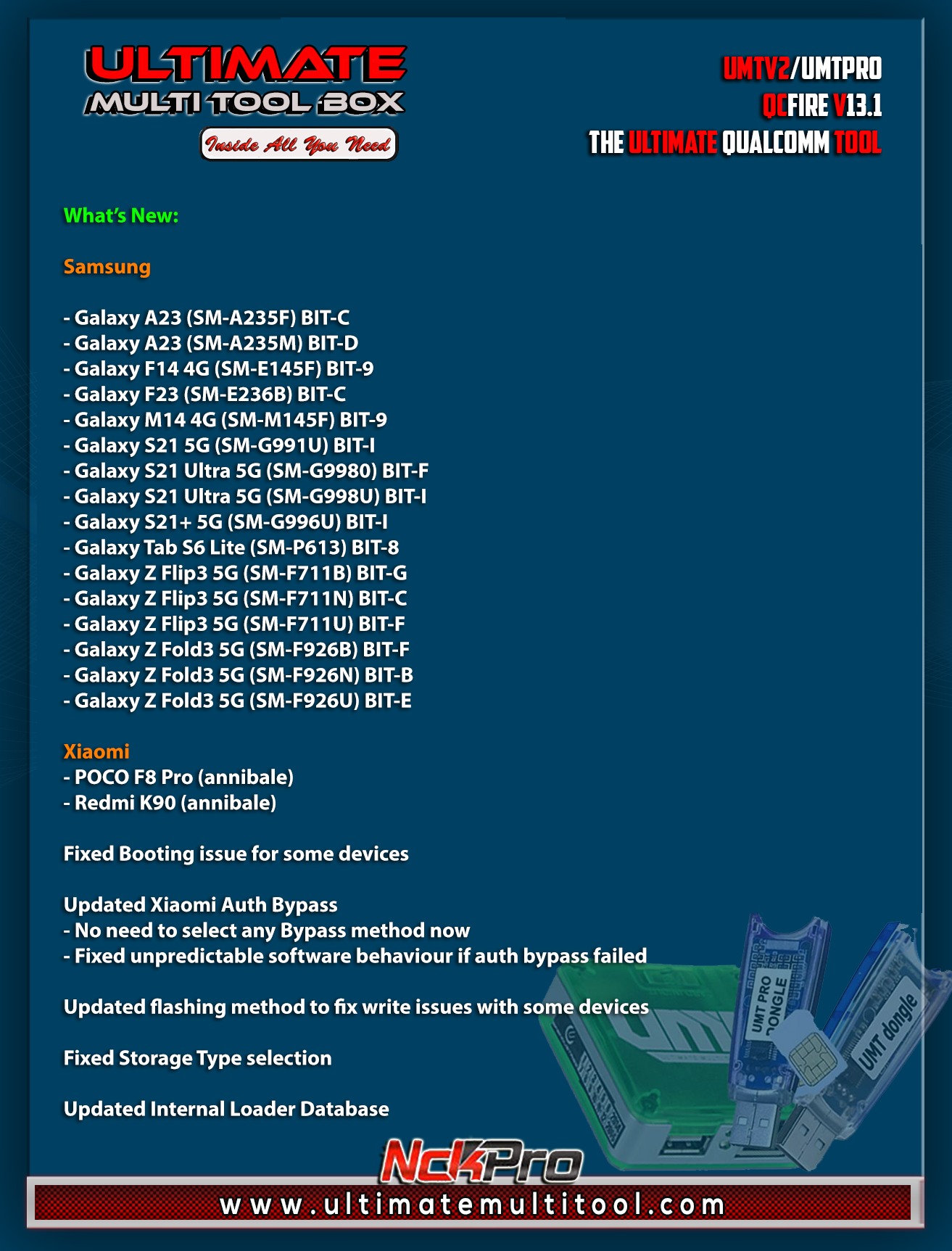
Added:
Samsung
- Galaxy A23 (SM-A235F) BIT-C
- Galaxy A23 (SM-A235M) BIT-D
- Galaxy F14 4G (SM-E145F) BIT-9
- Galaxy F23 (SM-E236B) BIT-C
- Galaxy M14 4G (SM-M145F) BIT-9
- Galaxy S21 5G (SM-G991U) BIT-I
- Galaxy S21 Ultra 5G (SM-G9980) BIT-F
- Galaxy S21 Ultra 5G (SM-G998U) BIT-I
- Galaxy S21+ 5G (SM-G996U) BIT-I
- Galaxy Tab S6 Lite (SM-P613) BIT-8
- Galaxy Z Flip3 5G (SM-F711B) BIT-G
- Galaxy Z Flip3 5G (SM-F711N) BIT-C
- Galaxy Z Flip3 5G (SM-F711U) BIT-F
- Galaxy Z Fold3 5G (SM-F926B) BIT-F
- Galaxy Z Fold3 5G (SM-F926N) BIT-B
- Galaxy Z Fold3 5G (SM-F926U) BIT-E
Xiaomi
- POCO F8 Pro (annibale)
- Redmi K90 (annibale)
Fixed Booting issue for some devices
Updated Xiaomi Auth Bypass
- No need to select any Bypass method now
- Fixed unpredictable software behaviour if auth bypass failed
Updated flashing method to fix write issues with some devices
Fixed Storage Type selection
Updated Internal Loader Database
This setup contains QcFire 12.8 (QcFire128.exe) In case of any issue with the latest version, you can use that and post logs from both latest and 12.8 to help us fix the issue.
CONNECTION METHOD FOR SAMSUNG:
Method to connect some Samsung Devices is already in Log.
For newer devices, do the following:
- Hold VOL UP + DOWN on Device.
- Hold Button on EDL Cable.
- Insert Cable to Device while holding EDL Cable Button.
- Now rapidly click both VOL UP + DOWN at the same time.
- Once you have clicked VOL UP + DOWN more than 3 times, leave EDL Cable Button but keep rapidly clicking VOL UP + DOWN.
- Stop clicking VOLUME Buttons once device is connected in EDL Mode.
- On new firmware version, you need to click VOL UP + DOWN rapidly for around 10-20 times.
Special thanks to all our users who helped us with their test reports.
Please use UMT Card Manager to Update Card Counter / Firmware / Activate Add-on, available via Support Access.
Fix Forbidden Application Detected Error
It Has Begun...
Keep Following Us...
Some Nice Updates Are On The Way...
SPECIAL THANKS TO OUR VALUABLE USERS FOR THEIR LOVE AND SUPPORT FOR MORE THAN 10 YEARS
What is GRTool website?
www.gsmrepairtool.com
GRTool is a firmware paid website, that will be updated always.
Why are we advertising it now?
For AVB Users you can register an account there and use as per Dongle or box user allowance.
Can we all use it as UMT users?
No, only those who have active cards 6 months or more or who buy new box or dongle or renews new license will have 1-year free support.
so basically, now you have a BIG saving on your new purchase or activation.
WARNING :
ESN / MEID / IMEI REPAIR IS INTENDED TO REPAIR ESN / MEID / IMEI TO ORIGINAL ONE WRITTEN ON PHONE BACK LABEL / BOX. WE DO NOT ENDORSE OR ENCOURAGE ESN / MEID / IMEI CHANGING. ITS ILLEGAL. USER IS SOLE RESPONSIBLE FOR ANY ILLEGAL ACTIVITY DONE WITH USE OF FEATURES PROVIDED IN OUR SOFTWARE, NOT LIMITED TO ESN / MEID / IMEI.
ANY USER USING OUR SOFTWARE FOR ILLEGAL PURPOSE WILL BE SOLE RESPONSIBLE FOR HIS ACTS.
WE PROHIBIT USE OF OUR SOFTWARE FOR ANY ILLEGAL PURPOSE.
STATUTORY WARNING - READ CAREFULLY
Using International Edition of our software is prohibited by Indian Law.
We strictly advice you to use Indian Edition if you are in India.
If you use International Edition in India, it may cause legal action against you by local law enforcement agencies.
We will not be liable for any loss or damaged caused.
How to Download:
- Download UMT Support Access.
- Connect UMT Box/Dongle to PC and Run UMT Support Access.
- Download required Executable from Installer folder.
- Enjoy!
- Download Mirrors
PLEASE DO NOT POST OFF TOPIC HERE. ONLY POST REGARDING THIS UPDATE AND SUPPORTED MODELS. ANY OFF TOPIC POST WILL BE DELETED
Telegram
Br,
UMT
UMTv2 / UMT Pro
Innovative and Intelligent
QcFire v13.1
The Ultimate Qualcomm Tool
Supported Functions
- Read / Write Firmware
- Backup / Restore QCN
- IMEI Repair in FTM/Diag + Flash Mode
- Backup / Reset / Restore Security (EFS)
- Reset FRP (Google Factory Reset Protection)
- Format UserData
- Read Pattern Lock (Android < 6.0, Un-Encrypted Devices Only)
- Reset Locks (PIN, Password, Pattern w/o Data Loss, Un-Encrypted Devices Only)
- Enable Diag (Need OEM Unlock, May not work on BL Locked Devices)
- Reboot to EDL from Fastboot
- Reset Mi Account for Xiaomi Devices
- Disable Mi Account for Xiaomi Devices
- Factory Reset (sideload Mode) for Xiaomi Devices
- Disable / Restore Locks for Encrypted Userdata
- Motorola Boot Repair
- Xiaomi EDL Locked Device Service
- Bootloader Unlock in EDL Mode for some Xiaomi Devices
- One Click Root in EDL Mode for Generic Qualcomm Devices
- Forensic Functions (Read Contacts / Messages in EDL Mode)
- One Click Lock Reset for Vivo Phones (Encrypted Userdata)
- Factory Method for Format FS
- EDL Authentication using Xiaomi Auth App (Service Account Required)
- Xiaomi Wipe EFS in Sideload Mode
- Xiaomi IMEI Repair for RSA Protected Phones
- Xiaomi Boot Loader Unlock
- Unique Method for Vivo Reset Locks for Protected Devices
- Xiaomi EDL Auth Using UMT Server
- Xiaomi Flashing in Fastboot Mode
- Nokia Factory Firmware (nb0) Direct Flashing in EDL mode
- Oppo OFP Firmware Exctration Added
- Xiaomi Free Auth Service (bypass).
- Mi Account Reset without Relock
- Mi Account Patch on Flashing (EDL/Fastboot)
- Samsung MDM Unlock in EDL Mode
- Huawei ID Reset
- Vivo Functions in Fastboot Mode
- Universal Huawei ID Reset
- Xiaomi Sideload Reset FRP/Mi Account
- Xiaomi Sideload Firmware Update
- Xiaomi Temporary BL Unlock
- Xiaomi Enable Diag (NO ROOT)
- Samsung Lost Mode Reset in EDL Mode
- Samsung KG Bypass
- Samsung Unbrick / Dead Boot Repair
- Samsung TAR to Unbrick Firmware Creator
- Xiaomi Auth Bypass For Newer Devices
- Oppo/Realme/OnePlus VIP Bypass
Added:
Samsung
- Galaxy A23 (SM-A235F) BIT-C
- Galaxy A23 (SM-A235M) BIT-D
- Galaxy F14 4G (SM-E145F) BIT-9
- Galaxy F23 (SM-E236B) BIT-C
- Galaxy M14 4G (SM-M145F) BIT-9
- Galaxy S21 5G (SM-G991U) BIT-I
- Galaxy S21 Ultra 5G (SM-G9980) BIT-F
- Galaxy S21 Ultra 5G (SM-G998U) BIT-I
- Galaxy S21+ 5G (SM-G996U) BIT-I
- Galaxy Tab S6 Lite (SM-P613) BIT-8
- Galaxy Z Flip3 5G (SM-F711B) BIT-G
- Galaxy Z Flip3 5G (SM-F711N) BIT-C
- Galaxy Z Flip3 5G (SM-F711U) BIT-F
- Galaxy Z Fold3 5G (SM-F926B) BIT-F
- Galaxy Z Fold3 5G (SM-F926N) BIT-B
- Galaxy Z Fold3 5G (SM-F926U) BIT-E
Xiaomi
- POCO F8 Pro (annibale)
- Redmi K90 (annibale)
Fixed Booting issue for some devices
Updated Xiaomi Auth Bypass
- No need to select any Bypass method now
- Fixed unpredictable software behaviour if auth bypass failed
Updated flashing method to fix write issues with some devices
Fixed Storage Type selection
Updated Internal Loader Database
This setup contains QcFire 12.8 (QcFire128.exe) In case of any issue with the latest version, you can use that and post logs from both latest and 12.8 to help us fix the issue.
CONNECTION METHOD FOR SAMSUNG:
Method to connect some Samsung Devices is already in Log.
For newer devices, do the following:
- Hold VOL UP + DOWN on Device.
- Hold Button on EDL Cable.
- Insert Cable to Device while holding EDL Cable Button.
- Now rapidly click both VOL UP + DOWN at the same time.
- Once you have clicked VOL UP + DOWN more than 3 times, leave EDL Cable Button but keep rapidly clicking VOL UP + DOWN.
- Stop clicking VOLUME Buttons once device is connected in EDL Mode.
- On new firmware version, you need to click VOL UP + DOWN rapidly for around 10-20 times.
Special thanks to all our users who helped us with their test reports.
Please use UMT Card Manager to Update Card Counter / Firmware / Activate Add-on, available via Support Access.
Fix Forbidden Application Detected Error
It Has Begun...
Keep Following Us...
Some Nice Updates Are On The Way...
SPECIAL THANKS TO OUR VALUABLE USERS FOR THEIR LOVE AND SUPPORT FOR MORE THAN 10 YEARS
What is GRTool website?
www.gsmrepairtool.com
GRTool is a firmware paid website, that will be updated always.
Why are we advertising it now?
For AVB Users you can register an account there and use as per Dongle or box user allowance.
Can we all use it as UMT users?
No, only those who have active cards 6 months or more or who buy new box or dongle or renews new license will have 1-year free support.
so basically, now you have a BIG saving on your new purchase or activation.
WARNING :
ESN / MEID / IMEI REPAIR IS INTENDED TO REPAIR ESN / MEID / IMEI TO ORIGINAL ONE WRITTEN ON PHONE BACK LABEL / BOX. WE DO NOT ENDORSE OR ENCOURAGE ESN / MEID / IMEI CHANGING. ITS ILLEGAL. USER IS SOLE RESPONSIBLE FOR ANY ILLEGAL ACTIVITY DONE WITH USE OF FEATURES PROVIDED IN OUR SOFTWARE, NOT LIMITED TO ESN / MEID / IMEI.
ANY USER USING OUR SOFTWARE FOR ILLEGAL PURPOSE WILL BE SOLE RESPONSIBLE FOR HIS ACTS.
WE PROHIBIT USE OF OUR SOFTWARE FOR ANY ILLEGAL PURPOSE.
STATUTORY WARNING - READ CAREFULLY
Using International Edition of our software is prohibited by Indian Law.
We strictly advice you to use Indian Edition if you are in India.
If you use International Edition in India, it may cause legal action against you by local law enforcement agencies.
We will not be liable for any loss or damaged caused.
How to Download:
- Download UMT Support Access.
- Connect UMT Box/Dongle to PC and Run UMT Support Access.
- Download required Executable from Installer folder.
- Enjoy!
- Download Mirrors
PLEASE DO NOT POST OFF TOPIC HERE. ONLY POST REGARDING THIS UPDATE AND SUPPORTED MODELS. ANY OFF TOPIC POST WILL BE DELETED
Telegram
Br,
UMT
Last edited: