
HOT Xiaomi Sideload Read Flash on Locked bootloader

Franky38

Moderator
Jul 28, 2018
2,590
2,633
PayPal:

Donate money to this user

​


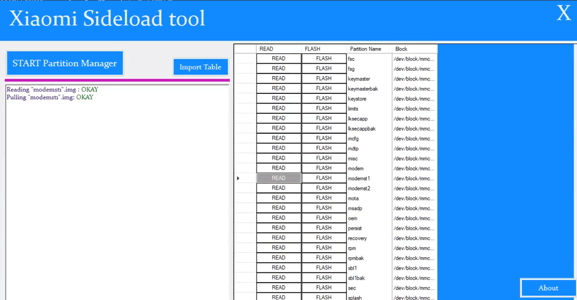
Xiaomi Sideload is a Partition Management app for Xiaomi smartphone running on MIUI 13 & Newer. with the help of this tool you can Read & write any Partition on locked bootloader.

Features:​

  • create Partition table
  • Import partition table from readback
  • Write any Partition on locked bootloader
  • Read any Partition on locked bootloader

Requirement:​

  • MIUI Recovery 5.0

Credit:​

  • developed by ROMProvider.COM

Download Links:​

How to use:​

  • Install adb driver on pc
  • enable usb debugging and connect device to computer using usb cable
  • run tool, click Start Partition Manager, once partition table readed,Your Phone rebooted to Stock Recovery
  • from the bin folder save demo2.txt to somewhere else it will help you when your device bricked or locked by FRP or Mi Account lock
  • from the recovery enable Mi assistant
  • Then select Read button to Read a partition and flash button to write a partition..

How to bypass Mi Account:​

  • Run tool
  • click Import table & locate demo2.txt readed by this tool
  • Connect Phone in recovery enable Mi Assistant
  • browse Persist partition, select Flash Option, Locate Persist image from original stock firmware & write
  • then patch Modem Image from stock firmware and write it under Modem partition

How to bypass FRP lock:​

  • Run tool
  • click Import table & locate demo2.txt readed by this tool
  • Connect Phone in recovery Enable Mi Assistant
  • browse FRP Partition, select Flash Option, Locate frp image from original stock firmware & write
  • reboot
 
Last edited:

shanramzan308

Active Member
Apr 18, 2022
33
7
pakistan

​


Xiaomi Sideload is a Partition Management app for Xiaomi smartphone running on MIUI 13 & Newer. with the help of this tool you can Read & write any Partition on locked bootloader.

Features:​

  • create Partition table
  • Import partition table from readback
  • Write any Partition on locked bootloader
  • Read any Partition on locked bootloader

Requirement:​

  • MIUI Recovery 5.0

Credit:​

  • developed by ROMProvider.COM

Download Links:​

How to use:​

  • Install adb driver on pc
  • enable usb debugging and connect device to computer using usb cable
  • run tool, click Start Partition Manager, once partition table readed,Your Phone rebooted to Stock Recovery
  • from the bin folder save demo2.txt to somewhere else it will help you when your device bricked or locked by FRP or Mi Account lock
  • from the recovery enable Mi assistant
  • Then select Read button to Read a partition and flash button to write a partition..

How to bypass Mi Account:​

  • Run tool
  • click Import table & locate demo2.txt readed by this tool
  • Connect Phone in recovery enable Mi Assistant
  • browse Persist partition, select Flash Option, Locate Persist image from original stock firmware & write
  • then patch Modem Image from stock firmware and write it under Modem partition

How to bypass FRP lock:​

  • Run tool
  • click Import table & locate demo2.txt readed by this tool
  • Connect Phone in recovery Enable Mi Assistant
  • browse FRP Partition, select Flash Option, Locate frp image from original stock firmware & write
  • reboot
It not just a tool it is a miracle thanks for nice tool romprovider.com
 

Franky38

Moderator
Jul 28, 2018
2,590
2,633
PayPal:

Donate money to this user
It not just a tool it is a miracle thanks for nice tool romprovider.com
Hello, it is very good and very useful and knowing how to use it saves you a lot of credits, access to the server, etc., that's why I found it very interesting and I wanted to share it for all users of this forum.
 
Top