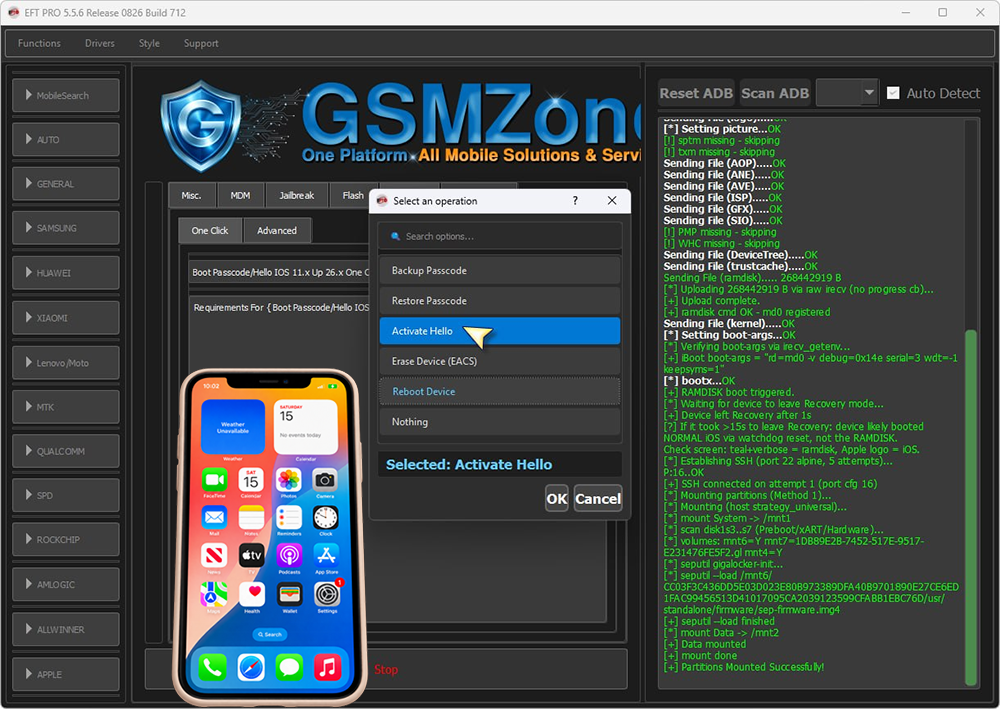
iphone xr hello screen bypass with eft pro no error camera and face id 100% working
[*] Checking device state...
[*] No ramdisk SSH - checking DFU/Recovery...
Detected A12/A13 device (iPhone11,8) - using Usbliter8 ramdisk boot
Preparing Environment : OK
Check Apple drivers..... ✓..
[*] Cleaning previous USB session state...
[+] PRODUCT: iPhone11,8 MODEL: n841ap ECID: 00114D282E63002E SRNM: ? CPID: 8020
Preparing usbliter8 bootchain....OK
[+] Selected: Method 1 (iPhone11,8-8020.zip)
Preparing RAMDISK payload (iPhone11.8 / iPhone11,8-8020.zip)....OK
[+] Payload loaded (ibss=0B kernel=18689456B ramdisk=268442919B)
[*] Booting patched iBEC (2159736 B) via usbliter8 CUSTOM_BOOT...
[*] Uploading patched iBEC (2159736 B) via libirecovery...
[*] CUSTOM_BOOT sent, waiting for device to transition...
[!] Please press and hold the POWER button for 2 seconds now.
[*] Waiting for device in recovery...
[+] iBEC booted, device in Recovery.
Preparing Environment : OK
Check Apple drivers..... ✓..
[*] Waiting 3s for iBEC/Recovery to settle...
[+] Recovery identity: ECID=00114D282E63002E SRNM=F71Z33XYKXKR CPID=8020
[*] Setting black (bgcolor 0 0 0)...OK
Sending File (logo).....OK
[*] Setting picture...OK
[!] sptm missing - skipping
[!] txm missing - skipping
Sending File (AOP).....OK
Sending File (ANE).....OK
Sending File (AVE).....OK
Sending File (ISP).....OK
Sending File (GFX).....OK
Sending File (SIO).....OK
[!] PMP missing - skipping
[!] WHC missing - skipping
Sending File (DeviceTree).....OK
Sending File (trustcache).....OK
Sending File (ramdisk)..... 268442919 B
[*] Uploading 268442919 B via raw irecv (no progress cb)...
[+] Upload complete.
[+] ramdisk cmd OK - md0 registered
Sending File (kernel).....OK
[*] Setting boot-args...OK
[*] Verifying boot-args via irecv_getenv...
[+] iBoot boot-args = "rd=md0 -v debug=0x14e serial=3 wdt=-1 keepsyms=1"
[*] bootx...OK
[+] RAMDISK boot triggered.
[*] Waiting for device to leave Recovery mode...
[+] Device left Recovery after 1s
[?] If it took >15s to leave Recovery: device likely booted
NORMAL iOS via watchdog reset, not the RAMDISK.
Check screen: teal+verbose = ramdisk, Apple logo = iOS.
[*] Establishing SSH (port 22 alpine, 5 attempts)...
P:16..OK
[+] SSH connected on attempt 1 (port cfg 16)
[*] Mounting partitions (Method 1)...
[*] Mounting (host strategy_universal)...
[*] mount System -> /mnt1
[*] scan disk1s3..s7 (Preboot/xART/Hardware)...
[*] volumes: mnt6=Y mnt7=97ABCE96-ED0B-5DCE-AE80-84AA1AEE60F3.gl mnt4=Y
[*] seputil gigalocker-init...
[*] seputil --load /mnt6/6A4846B6A548EC0A9283B5B5173035D4B67F82113DBDC37ED1D3C8A2838A40EB7679BF134CE8F86A8749FD2DF094BC14/usr/standalone/firmware/sep-firmware.img4
[+] seputil --load finished
[*] mount Data -> /mnt2
[+] Data mounted
[+] mount done
[+] Partitions Mounted Successfully!
[*] Activate Hello (ramdisk)...
[+] Hello identity: ECID=00114D282E63002E SRNM=F71Z33XYKXKR CPID=8020
[*] Hello No Change: ecid=00114D282E63002E sn=F71Z33XYKXKR cpid=8020
[*] Generating Activation Files...
[+] Activation files ready
[*] Hello No Change install (RestorePassCode staging + cp)...
[*] Staging uploads at /mnt8/Media/Downloads
[+] staged OK fair=1 act=1 comm=1 purple=1 disabled=1 at /mnt8/Media/Downloads
[*] Restoring activation_record (RestorePassCode)...
[*] Restoring FairPlay via Media/Downloads staging...
[*] Installing HelloNoChange templates (shell cp)...
[+] purplebuddy installed (best-effort)
[*] Patching data_ark (hello-nochange keys)...
[+] data_ark patched
[*] MobileGestalt: leave native CPID/content unchanged (No Change)
[+] MobileGestalt present (untouched)
[*] Locking activation / FairPlay / prefs...
[+] Hello No Change install verified
[*] Rebooting device (/sbin/reboot)...
[+] Activate Hello done
Operation {Boot Passcode/Hello IOS 11.x Up 26.x One Click} ID: D3D697F2927CA57F
Elapsed time 03:28 -- Version 5.5.7 Release 0826 Build 712