


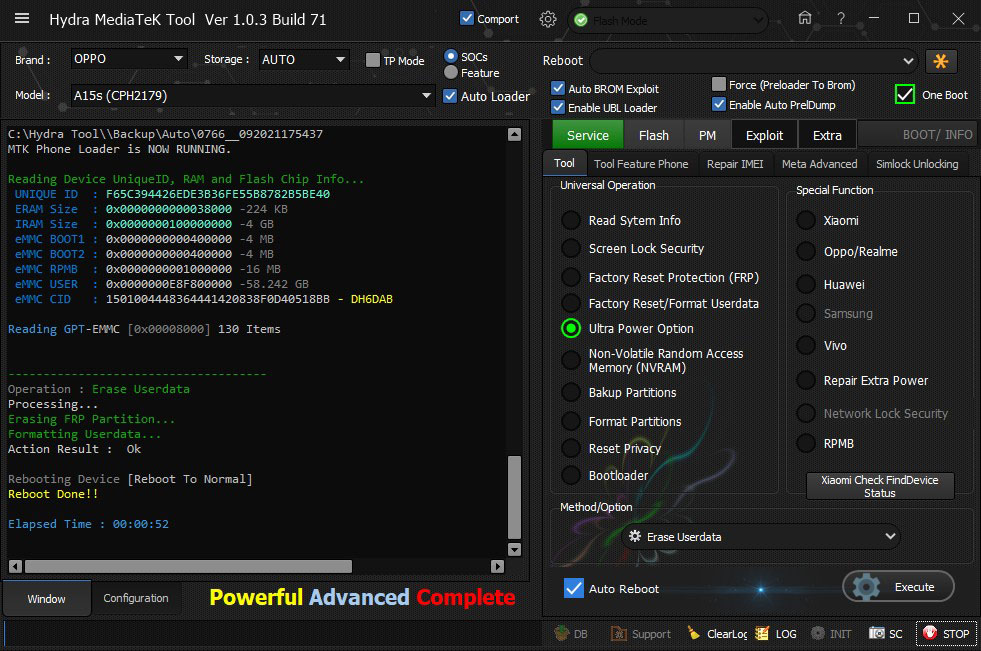
OPPO A15S (CPH 2179) FRP Successfully Removed by Hydra Tool
1. Run Hydra MTK Module.
2. Tick "Brand" and "Module".
3. Tick "Comport"
4. Select "Auto Broom Exploit", "Enable UBL Loader" and "Enable PrelDUMP"
5. Choose "service"-->"Tool" Tab
6. Choose "Ultra Power Option"
7. Choose "Erase User Data" from drop down menu
8. Click on "Execute"
9. Connect Cellphone to the computer using USB Data Cable.
10. Wait until the process is completed.
2. Tick "Brand" and "Module".
3. Tick "Comport"
4. Select "Auto Broom Exploit", "Enable UBL Loader" and "Enable PrelDUMP"
5. Choose "service"-->"Tool" Tab
6. Choose "Ultra Power Option"
7. Choose "Erase User Data" from drop down menu
8. Click on "Execute"
9. Connect Cellphone to the computer using USB Data Cable.
10. Wait until the process is completed.
Screen Short:
Mount Everest
