


- Jul 28, 2018
- 2,589
- 2,632
- PayPal:
-

I found SnapdragonFlash NoAuth v2.0 when it was shared from GitHub and later posted on Facebook. It is a small Windows tool for flashing Qualcomm-based Xiaomi, Redmi and POCO phones. The developer shown for the tool is Rasheed.
I used it on my Redmi Note 7 Pro and first tried the EDL flashing option. I connected the phone in EDL mode, selected the firmware folder and started the flash. The process started normally on my phone, and there was no auth request during the flashing. and is very big information in gsm world because auth mean many struggle amount charge depend on server if failed to flash than also charge the money auth free mean you can without any paid work do it unlimited time.
I also checked the fastboot option after that. The device was detected and the flashing process started there too. The screenshot shows the tool working with a vendor image and displaying the progress in its main window.
The program itself is quite simple. At the top, there is a place to select the firmware folder, along with Refresh and Start Flash buttons. When a phone is connected, the tool shows the device, progress, elapsed time, status and result in the table below.
The main screen has a select button for choosing the firmware location. There is also a refresh button and a start flash button. Once a device is connected, its information is shown in the table below.
The table contains columns for ID, device, progress, elapsed time, status and result. This makes it possible to see what the tool is doing while the flash operation is running.
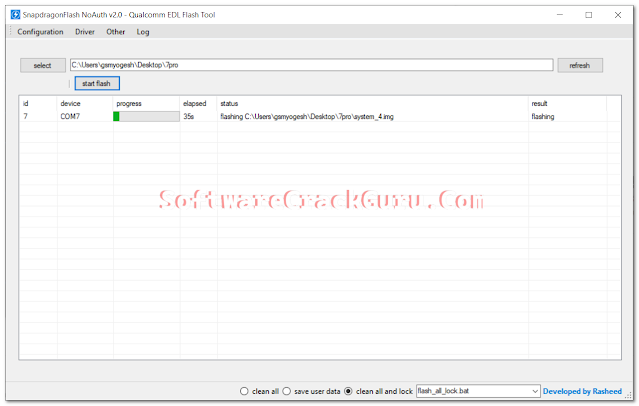
The screenshot also shows the elapsed time at 35 seconds at the point when the image was captured. The result column was showing flashing, meaning the process was still running when the screenshot was taken.
For the EDL test, I selected the firmware folder and started the flash operation. In my case, the Redmi Note 7 Pro flashing worked without an authentication request.
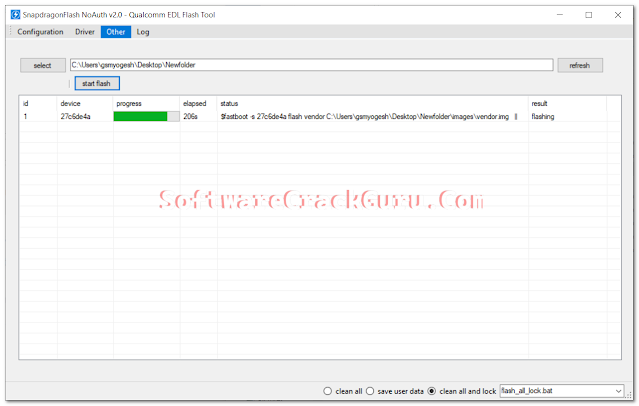
I also checked the other flashing screen. In this screenshot, the device ID is shown as 27c6de4a. The status line shows a fastboot command being used with a vendor image, and the result again shows flashing.
The second screenshot also shows the Other tab selected. The firmware path is visible at the top, followed by the refresh and start flash controls. The progress bar is active while the vendor image is being processed.
The tool is also listed for Xiaomi, Redmi and POCO devices. No individual device list was provided, so I am only mentioning the brands given with the tool.
The screenshot also shows a batch file selection field with flash_all_lock.bat visible. These controls are part of the flashing screen shown in the supplied screenshots.
Because the available screenshots only show the flashing process in progress, I am not adding any extra explanation about options that are not clearly shown or described in the supplied information.
The tool was shared from a GitHub release and was also being shared on Facebook when I came across it. I am posting the information here based on the supplied details and the screenshots provided.
Officially - Release SnapdragonFlash NoAuth v2.0 · xcracker000/SnapdragonFlash-Tool
Mirror - SnapdragonFlash_v2.0.zip
Credits: SoftwareCrackGuru and Developer: Rasheed
I used it on my Redmi Note 7 Pro and first tried the EDL flashing option. I connected the phone in EDL mode, selected the firmware folder and started the flash. The process started normally on my phone, and there was no auth request during the flashing. and is very big information in gsm world because auth mean many struggle amount charge depend on server if failed to flash than also charge the money auth free mean you can without any paid work do it unlimited time.
I also checked the fastboot option after that. The device was detected and the flashing process started there too. The screenshot shows the tool working with a vendor image and displaying the progress in its main window.
The program itself is quite simple. At the top, there is a place to select the firmware folder, along with Refresh and Start Flash buttons. When a phone is connected, the tool shows the device, progress, elapsed time, status and result in the table below.
SnapdragonFlash NoAuth v2.0
The software window clearly shows the name SnapdragonFlash NoAuth v2.0 - Qualcomm EDL Flash Tool. At the top there are tabs for Configuration, Driver, Other and Log.The main screen has a select button for choosing the firmware location. There is also a refresh button and a start flash button. Once a device is connected, its information is shown in the table below.
The table contains columns for ID, device, progress, elapsed time, status and result. This makes it possible to see what the tool is doing while the flash operation is running.
My Flashing Check
I checked the tool with a Redmi Note 7 Pro. My first check was through EDL mode. The tool detected the device and started the flashing process. The screenshot shows a connected device on COM7, with the progress bar active and the status showing a system image being flashed.The screenshot also shows the elapsed time at 35 seconds at the point when the image was captured. The result column was showing flashing, meaning the process was still running when the screenshot was taken.
For the EDL test, I selected the firmware folder and started the flash operation. In my case, the Redmi Note 7 Pro flashing worked without an authentication request.
I also checked the other flashing screen. In this screenshot, the device ID is shown as 27c6de4a. The status line shows a fastboot command being used with a vendor image, and the result again shows flashing.
The second screenshot also shows the Other tab selected. The firmware path is visible at the top, followed by the refresh and start flash controls. The progress bar is active while the vendor image is being processed.
What the Tool Supports
The information provided with SnapdragonFlash NoAuth v2.0 lists support for Qualcomm Snapdragon chipsets from different Snapdragon series. The listed range starts from Snapdragon 845 and goes up to Snapdragon 8 Elite in the SD8xx group.The tool is also listed for Xiaomi, Redmi and POCO devices. No individual device list was provided, so I am only mentioning the brands given with the tool.
- Qualcomm EDL Flash Tool: The program is designed for flashing Qualcomm devices through EDL mode.
- 47 Snapdragon chipset compatibility: The supplied information lists compatibility covering Snapdragon chipsets from SD845 to SD8 Elite.
- Xiaomi / Redmi / POCO support: These three device brands are listed as supported.
- No authentication required: The tool is presented as a NoAuth flash tool and did not ask for authentication during my stated test.
Supported Snapdragon Chipsets
| Series | Chipsets |
|---|---|
| SD8xx | SD845, SD855, SD865, SD870, SD888, SD8+Gen1, SD8Gen2, SD8Gen3, SD8Elite |
| SD7xx | SD710, SD730, SD750G, SD765G, SD778G, SD7+Gen1, SD7+Gen2, SD7+Gen3 |
| SD6xx | SD636, SD660, SD665, SD670, SD675, SD680, SD695, SD6Gen1 |
| SD4xx | SD460, SD480, SD4Gen1, SD4Gen2, SD4Gen3 |
| Other | SD2Gen1, SW5100 |
Flashing Options Shown in the Tool
At the bottom of the main window, the software shows three options: clean all, save user data and clean all and lock.The screenshot also shows a batch file selection field with flash_all_lock.bat visible. These controls are part of the flashing screen shown in the supplied screenshots.
Because the available screenshots only show the flashing process in progress, I am not adding any extra explanation about options that are not clearly shown or described in the supplied information.
How to Use SnapdragonFlash NoAuth v2.0
- Extract the downloaded ZIP file to a folder on your Windows computer.
- If the required driver is not already installed, install the Qualcomm 9008 drivers.
- Connect the Xiaomi, Redmi or POCO device in EDL mode using the stated Volume Up + Volume Down + USB connection method.
- Open the tool and select the firmware path.
- Start the flashing process and watch the progress shown in the main table.
Developer Credit
SnapdragonFlash NoAuth v2.0 is developed by Rasheed. Credit goes to Rasheed for developing the Qualcomm-based Xiaomi flashing tool described here.The tool was shared from a GitHub release and was also being shared on Facebook when I came across it. I am posting the information here based on the supplied details and the screenshots provided.
Software Information
| Software Name | SnapdragonFlash NoAuth |
|---|---|
| Version | v2.0 |
| Developer | Rasheed |
| Supported OS | Windows computers |
| Supported Devices | Xiaomi, Redmi and POCO smartphones |
Download SnapdragonFlash NoAuth v2.0
SnapdragonFlash NoAuth v2.0 is the version covered in this article. The developer credited for the tool is Rasheed.Officially - Release SnapdragonFlash NoAuth v2.0 · xcracker000/SnapdragonFlash-Tool
Mirror - SnapdragonFlash_v2.0.zip
Credits: SoftwareCrackGuru and Developer: Rasheed
