


- Jul 28, 2018
- 2,589
- 2,632
- PayPal:
-

Xiaomi Firmware Assistant is a Windows tool for working with Xiaomi phones in the required sideload mode. I checked the supplied build and found options to read the phone information, verify an OTA firmware package, install firmware, erase data and restart the device. For OTA verification, I would use a newer firmware version than the one already installed on the phone. The tool is developed by GSMYOGESH.COM.
Credits: SoftwareCrackGurú and Developer: GSMYOGESH.COM
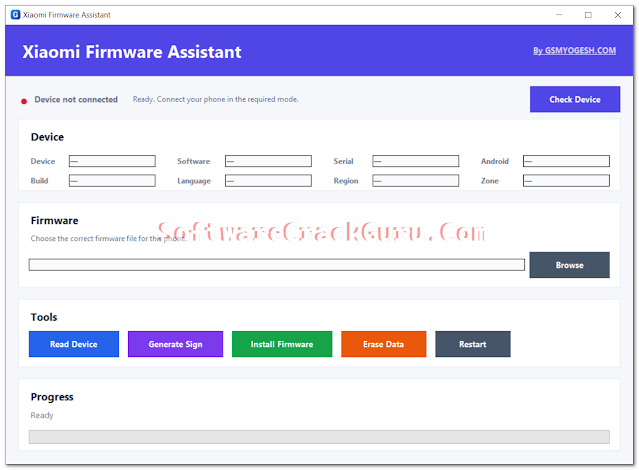
Features Xiaomi Firmware Assistant OTA Tool
- Check Device: Connects with the Xiaomi phone and checks whether the device is available in the required mode.
- Read Device: Reads details such as the device name, installed software version, serial, Android information, build, language, region and zone.
- OTA Firmware Verification: Checks the selected firmware using the phone information before installation.
- Server Validation: The firmware check uses the Xiaomi update service and requires an internet connection.
- Generate Sign: Prepares the selected firmware for the installation stage after the validation check is completed.
- Install Firmware: Installs the selected and validated firmware package through the supported Xiaomi sideload process.
- Progress Bar: Shows the installation progress while the firmware is being transferred.
- Erase Data: Removes personal data from the connected phone. The tool warns that photos, apps and other files may be deleted.
- Restart: Sends a restart command to the connected Xiaomi phone.
- OTA Version Check Workflow: The installed software version can be checked first, then a matching OTA version higher than the installed build can be selected for verification.
What's New (Changelog)
- Firmware validation is included before the installation process.
- Current Xiaomi device information can be read before selecting firmware.
- OTA firmware can be selected directly from the firmware section.
- Server-based firmware validation is used before installation.
- Firmware installation includes a progress indicator.
- Separate options are available for Erase Data and Restart.
How to Install Xiaomi Firmware Assistant
- Download the Xiaomi Firmware Assistant package from the download section below.
- Extract the downloaded ZIP file if it is provided as an archive.
- Open the extracted folder and start the tool.
- Connect the Xiaomi phone in the required sideload mode.
- Use Check Device and then Read Device to check the current phone information.
- Note the software version currently installed on the phone.
- Select a matching OTA firmware package that is higher than the installed version.
- Click Generate Sign and wait for the Xiaomi server verification to finish.
- If the firmware is accepted, continue with Install Firmware.
- Keep the USB cable connected while the firmware is being installed.
- Wait until the progress reaches 100% and the tool reports that installation is finished.
- Restart the phone and check the software version again after it boots.
Download Xiaomi Firmware Assistant Latest Version
Xiaomi Firmware AssistantCredits: SoftwareCrackGurú and Developer: GSMYOGESH.COM