



- Jul 28, 2018
- 2,582
- 2,619
- PayPal:
-

Hello friends, today I am sharing a small project that I recently made for Xiaomi users. The tool name is Xiaomi Firmware Tool Beta V0.1. I started this project because every time I flashed Xiaomi firmware, I felt that most tools were doing the same thing but in a complicated way. Some need extra software for extraction, some show too many command windows, and some are confusing for new users.
While working on this project, my main target was to keep everything simple. I didn't want users to download WinRAR, 7-Zip, or other programs just to extract firmware. So I added a built-in extraction system. Just select the firmware package and the tool will handle the extraction automatically in the same folder. During my testing, it was much faster than the method I normally use.
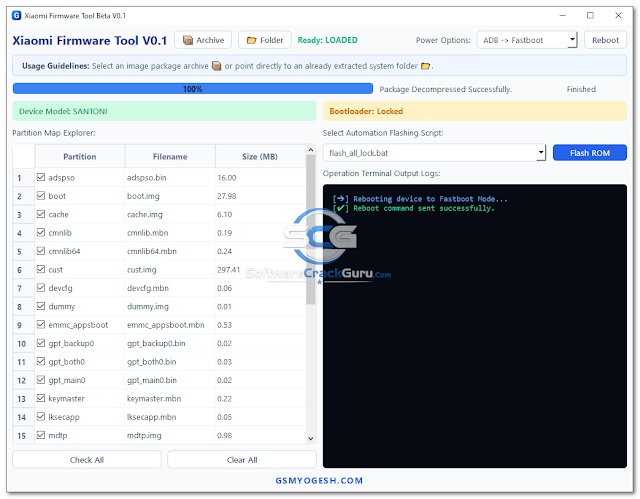
I also added some information on the left side of the tool because I personally like to see device details before flashing. When a phone is connected in Fastboot mode, the tool can show the detected codename and bootloader status. This way you can quickly check whether the correct device is connected or not.
Another thing I added was the Partition Manager. Sometimes we don't want to flash the complete firmware package. Maybe only a few partitions are needed. With this section you can simply tick or untick partitions before starting the process. I have used this feature many times while testing and it saved me from flashing unnecessary files.
The tool works with both locked and unlocked bootloader devices. Of course, Xiaomi restrictions are still there on locked devices, so some operations may not work depending on the firmware and device model. On unlocked devices everything is usually smoother because there are fewer restrictions from the bootloader side.
One feature that I really wanted from the beginning was firmware checking. I have seen many users flash the wrong ROM by mistake and then spend hours trying to recover the phone. Because of that, the tool checks the connected device and compares it with the loaded firmware before starting the flash process.
I also didn't like the messy logs shown by many flashing tools. Most users don't understand hundreds of command lines moving on the screen. In this project I tried to keep the logs cleaner and easier to read. You can still follow the progress, but without all the unnecessary clutter.
Right now this is only the first beta version and I still have many ideas for future updates. Some features are already planned and a few things still need improvement. For now, I just wanted to release a working version and get feedback from users before adding more functions. i next update i m add a new features which is free update of this tool.
Power off the phone completely and boot it into Fastboot Mode. In most Xiaomi devices, this can be done by pressing Volume Down and Power together.
Connect the device to your computer using a good quality USB cable.
If you have downloaded a compressed firmware package, click the Archive button and select the firmware file. The tool will automatically extract it into the same location.
If your firmware is already extracted, simply click the Folder button and select the firmware directory.
The Partition Manager will show available image files together with their size information.
Select the flashing profile that you want to use.
Check the detected device codename.
Check the current bootloader status.
Make sure the loaded firmware matches the connected device before continuing.
By default, important partitions are selected automatically.
If required, you can manually select or deselect partitions before starting the operation.
The tool will start processing the firmware and display live progress information.
Do not disconnect the USB cable during the operation.
Wait until the flashing process finishes successfully and the device reboots.
Credits: Softwarecrakgurú and Developer: GSMYOGESH.COM
While working on this project, my main target was to keep everything simple. I didn't want users to download WinRAR, 7-Zip, or other programs just to extract firmware. So I added a built-in extraction system. Just select the firmware package and the tool will handle the extraction automatically in the same folder. During my testing, it was much faster than the method I normally use.
I also added some information on the left side of the tool because I personally like to see device details before flashing. When a phone is connected in Fastboot mode, the tool can show the detected codename and bootloader status. This way you can quickly check whether the correct device is connected or not.
Another thing I added was the Partition Manager. Sometimes we don't want to flash the complete firmware package. Maybe only a few partitions are needed. With this section you can simply tick or untick partitions before starting the process. I have used this feature many times while testing and it saved me from flashing unnecessary files.
The tool works with both locked and unlocked bootloader devices. Of course, Xiaomi restrictions are still there on locked devices, so some operations may not work depending on the firmware and device model. On unlocked devices everything is usually smoother because there are fewer restrictions from the bootloader side.
One feature that I really wanted from the beginning was firmware checking. I have seen many users flash the wrong ROM by mistake and then spend hours trying to recover the phone. Because of that, the tool checks the connected device and compares it with the loaded firmware before starting the flash process.
I also didn't like the messy logs shown by many flashing tools. Most users don't understand hundreds of command lines moving on the screen. In this project I tried to keep the logs cleaner and easier to read. You can still follow the progress, but without all the unnecessary clutter.
Right now this is only the first beta version and I still have many ideas for future updates. Some features are already planned and a few things still need improvement. For now, I just wanted to release a working version and get feedback from users before adding more functions. i next update i m add a new features which is free update of this tool.
Features list
- Python-based modern GUI
- Automatic firmware package detection
- Supports ZIP, TGZ and TAR firmware files
- Built-in extraction engine
- No WinRAR or 7-Zip required
- Fast firmware extraction
- Device codename detection
- Fastboot device identification
- Bootloader status detection
- Locked and unlocked device support
- Advanced Partition Manager
- Select partition option
- Deselect partition option
- Automatic firmware analysis
- Firmware compatibility verification
- Anti-wrong firmware protection
- Flash script detection
- Clean operation logs
- Real-time progress tracking
- File size information display
- Partition information viewer
- One-click reboot functions
- Beginner-friendly interface
- Professional workspace layout
- Xiaomi Fastboot firmware support
How to use it?
Step 1: Connect Your Device
First, make sure your device has enough battery power before starting any flashing operation.Power off the phone completely and boot it into Fastboot Mode. In most Xiaomi devices, this can be done by pressing Volume Down and Power together.
Connect the device to your computer using a good quality USB cable.
Step 2: Load Firmware
Open Xiaomi Firmware Tool.If you have downloaded a compressed firmware package, click the Archive button and select the firmware file. The tool will automatically extract it into the same location.
If your firmware is already extracted, simply click the Folder button and select the firmware directory.
Step 3: Check Firmware Information
After loading the firmware, the tool will scan all available files.The Partition Manager will show available image files together with their size information.
Select the flashing profile that you want to use.
Step 4: Verify Device Information
Look at the left side of the software window.Check the detected device codename.
Check the current bootloader status.
Make sure the loaded firmware matches the connected device before continuing.
Step 5: Select Partitions
Review the Partition Manager list.By default, important partitions are selected automatically.
If required, you can manually select or deselect partitions before starting the operation.
Step 6: Start Flashing
After reviewing all information, click the Flash ROM button.The tool will start processing the firmware and display live progress information.
Do not disconnect the USB cable during the operation.
Wait until the flashing process finishes successfully and the device reboots.
Download Link
- Tool Name: Xiaomi Firmware Tool v0.1
- Version: Beta V0.1
- Developer: GSMYOGESH.COM
- Supported Platform: Windows
- Supported Devices: Xiaomi Fastboot Devices
- License: Free
- Status: Beta Release
- Download Link: Google Drive | MEGA
- Password: softwarecrackguru
 Important Note: Important Note:All tools, files, and guides shared on this website are only for educational and testing purposes. Always scan files before use and use everything at your own risk. By downloading any software or following any guide from this website, you automatically agree and accept this policy. |
Credits: Softwarecrakgurú and Developer: GSMYOGESH.COM
